LCP Optimization Guide: Improve SEO and Core Web Vitals with Image CDN
Q1. What is LCP?
LCP (Largest Contentful Paint) measures how long it takes for the main content of a webpage to fully render. It directly affects how fast users perceive your site.
Q2. Why should you optimize LCP?
According to Walmart Labs, converted users’ average page load time was 3.22 seconds, while non-converted users averaged 6.03 seconds — highlighting how page speed directly affects conversion rate.
Q3. What are the main causes of slow LCP?
The biggest reasons are unoptimized images, slow server responses, and lack of CDN usage.
Q4. Can image optimization improve LCP?
Yes.
By optimizing image formats (WebP), adjusting dimensions, and implementing smart loading strategies with an image CDN, you can achieve up to 10–20x faster load speeds compared to serving raw images directly.
Q5. How can you verify LCP improvements?
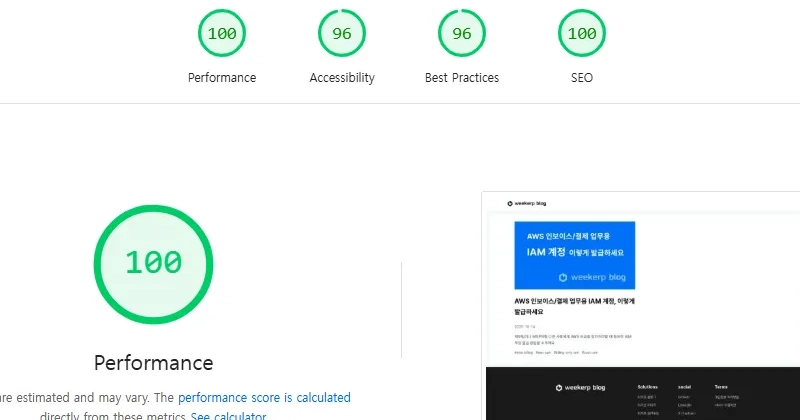
You can measure and compare your results using PageSpeed Insights.
LCP Optimization: Faster Loading, Higher Conversions
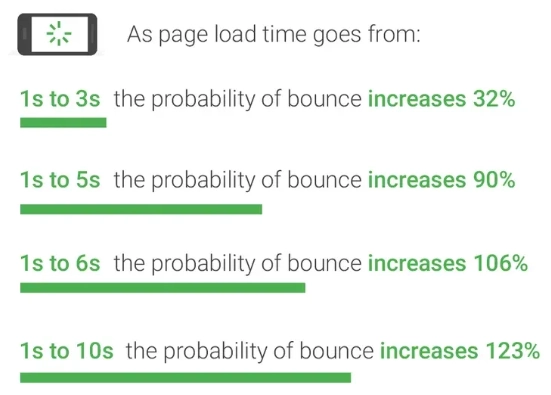
Google’s research shows that as page load time increases from 1s to 10s, the probability of users bouncing off the page jumps from 32% to 123%.
Walmart Labs observed a similar trend — converted users loaded pages in 3.22s on average, compared to 6.03s for non-converted users, nearly doubling the conversion rate.
Understanding LCP (Largest Contentful Paint)
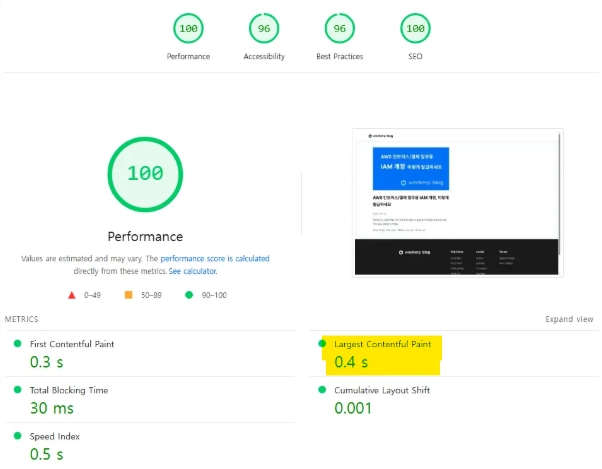
LCP represents the moment when users perceive the page as fully loaded. It measures the time taken to render the largest visible element — often an image, video, or heading. The main page of Weekerp Blog currently achieves an LCP score of 0.4s, meeting Google’s “Good” benchmark.
LCP Scoring Standards (Google Core Web Vitals)
Google evaluates LCP performance based on the following standards.
| LCP Time | Rating | Description |
|---|---|---|
| ≤ 2.5s | ✅ Good | Fast, smooth experience |
| 2.5s–4.0s | ⚠️ Needs Improvement | Optimization recommended |
| ≥ 4.0s | ❌ Poor | Slow loading, high bounce risk |
For example, if the main banner image loads slowly, users may perceive the page as “not fully loaded” even after all content has technically finished loading. This becomes one of the main causes of poor LCP scores.
Why LCP Becomes Slow
According to Google’s research, the average mobile page takes around 7 seconds to load, meaning many users leave before even seeing your key content.
There are three main causes:
1️⃣ Unoptimized Images and Videos
-
The most common reason for poor LCP.
-
Using raw JPEG or PNG files or embedding videos directly increases load time dramatically.
-
Large hero images on the top of the page worsen the issue.
2️⃣ Slow Server Response (TTFB)
-
High TTFB delays when image requests begin.
-
Without a CDN, user-to-server distance adds latency.
3️⃣ Render-Blocking Resources
- CSS or JavaScript that delay hero image rendering can block the visual display
even when the content is technically loaded.
How to Improve LCP
1️⃣ Optimize Image Formats
Changing the image format is the most basic step in improving LCP.
-
Convert JPEG → WebP or AVIF to reduce size by 30–70%.
-
Use
<picture>andsrcsetto serve the best format for each browser.
<img src="/img/hero.webp" alt="Hero Image" loading="eager" />
2️⃣ Preload Critical Images
LCP elements should never be lazy-loaded.
The hero image must load immediately:
<link rel="preload" as="image" href="/img/hero.webp" />
💡 Tip: Preload tells the browser to fetch the resource before rendering starts.
3️⃣ Apply Lazy Loading Properly
Lazy-load below-the-fold images only.
For above-the-fold elements, use loading="eager" to ensure instant rendering.
4️⃣ Use CDN and Edge Computing
A CDN (Content Delivery Network) shortens the physical distance between your server and the user, improving response time and transfer speed. With cached assets at edge locations, your content loads faster anywhere in the world.
Example: AWS CloudFront with Lambda@Edge can build a CDN with edge logic.
Weekerp Image, however, automates WebP conversion and resizing with global edge caching — no setup required.
Weekerp Case Study: Results and Verification
Test Environment
-
Before: Direct output from Next.js server using PNG original
-
After: Weekerp Image CDN + WebP conversion
| Metric | Before | After | Result |
|---|---|---|---|
| Image load Time | 36 ms | 3 ms | ~10 x faster |
| Image File Size | 30.2 KB | 3 KB | ~20 x smaller |
Even with small files, the improvement is clear. For larger assets, CDN-based optimization can greatly improve load stability and reduce server costs.
Tested on Weekerp Image
-
Weekerp Image operates across 400+ global edge regions, guaranteeing consistent speed and lightweight delivery.
-
It connects to your existing cloud storage — no data migration required.
-
Automatically optimizes AVIF/WebP conversion and global caching for LCP improvement.
Key Takeaways
-
LCP optimization is one of the most important metrics in Core Web Vitals, directly reflecting perceived speed.
-
By optimizing image formats, applying preload, and using CDNs, you can reduce most LCP values by over 50%.
- LCP improvement enhances conversion rate, SEO performance, and user experience all at once.
LCP shapes the first impression of your website. As modern websites rely heavily on large images and videos, optimizing LCP has become essential. Technical SEO is a data-driven field — with efficient image optimization, you can achieve massive performance gains with minimal cost.
LCP shapes the first impression of your website. As modern websites rely heavily on rich media like images and videos, optimizing LCP is no longer optional — it’s essential. With efficient image optimization, you can achieve massive performance gains at minimal cost.
Stay tuned for more insights on web performance optimization from Weekerp.
Frequently asked questions
Why should you optimize LCP?
According to Walmart Labs, converted users’ average page load time was 3.22 seconds, while non-converted users averaged 6.03 seconds — highlighting how page speed directly affects conversion rate.
What are the main causes of slow LCP?
The biggest reasons are unoptimized images, slow server responses, and lack of CDN usage.
Can image optimization improve LCP?
Yes. By optimizing image formats (WebP), adjusting dimensions, and implementing smart loading strategies with an image CDN, you can achieve up to 10–20x faster load speeds compared to serving raw images directly.
How can you verify LCP improvements?
You can measure and compare your results using PageSpeed Insights] https://pagespeed.web.dev/)
What is LCP
LCP (Largest Contentful Paint) measures how long it takes for the main content of a webpage to fully render. It directly affects how fast users perceive your site.