GA4 AI Assistants Channel: What ai-assistant Tracks and Misses
What the ai-assistant Medium Tracks and What It Misses
On May 13, 2026, Google Analytics 4 added the AI Assistants channel to its default channel group. Traffic from generative search and conversational services such as ChatGPT, Gemini, and Claude can now be separated from existing Referral traffic and classified automatically in standard reports without creating custom regular expressions or custom channels.
The feature was rolled out gradually across accounts after the official announcement, and the new channel began appearing in most GA4 properties by early June.
However, there is one important point to understand when interpreting this number.
The GA4 AI Assistants figure does not represent total AI visibility.
It is closer to a minimum count, or lower bound, that includes only the clicks GA4 can identify.
Let us look at what GA4 can now measure and what it still cannot see.
Key Takeaways
-
Starting in May 2026, GA4 began classifying traffic from ChatGPT, Gemini, Claude, and similar services under the
AI Assistantschannel and theai-assistantmedium. In other words, GA4 officially began classifying AI traffic. -
No additional setup is required, but the feature has a limitation: it only counts clicks from AI services recognized by Google when the referrer is passed correctly.
-
Due to the way this tracking works, referrer information may disappear in mobile apps and in-app browsers, causing some visits to go unmeasured as AI traffic. Google AI Overview and AI Mode traffic is classified as Organic Search.
-
Because GA4 did not retroactively reclassify historical data, older traffic that was not classified as AI traffic will usually remain under
DirectorReferral. -
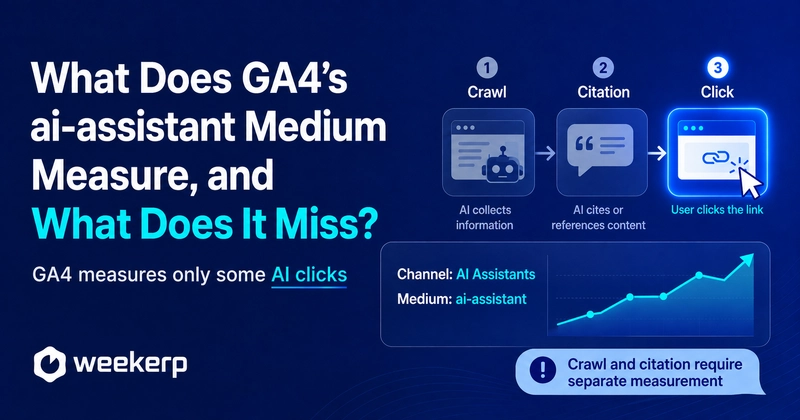
To measure AI search performance properly, it should be divided into three stages: (1) crawling, (2) citations, and (3) clicks.
-
(1) Crawling can be checked through server, CDN, or WAF logs, or through Weekerp. (2) Citations can be measured through question-based brand and source monitoring or tools such as Profound. (3) Clicks can be measured in GA4.
-
When reviewing AI Assistants traffic in GA4, check
Session source / mediumas well to identify which AI service generated the visit.
1. What Does the GA4 AI Assistants Channel Track?
When a user clicks a link in an AI assistant recognized by GA4 and visits a website, GA4 automatically changes three traffic dimensions for that session.
| Dimension | Value |
|---|---|
| Medium | ai-assistant |
| Default channel group | AI Assistants |
| Campaign | (ai-assistant) |
For example, if a user clicks a link to the Weekerp blog from ChatGPT, the session may appear as follows.
Source: chatgpt.com
Medium: ai-assistant
Campaign: (ai-assistant)
Channel: AI Assistants
Google's official announcement specifically identifies the medium, channel group, and campaign as the values that change. The source is not consolidated into a single shared value, so performance can still be separated by the original traffic source, such as chatgpt.com or gemini.google.com.
No Additional Setup Is Required: How to Check Each AI Service
If you use the default channel group, you do not need to create a regular expression or add an event manually.
GA4 automatically classifies the traffic, and you can find it through the following path.
Reports
→ Acquisition
→ Traffic acquisition
→ Session default channel group
→ AI Assistants
To break the traffic down by assistant, change the primary dimension to Session source / medium.
chatgpt.com / ai-assistant
gemini.google.com / ai-assistant
claude.ai / ai-assistant
The AI Assistants channel combines multiple services into one channel. To compare performance by service, you also need to review the source dimension.
2. Historical Data Is Not Reclassified Retroactively
Adding the new channel does not reclassify all historical Referral traffic. Visits from ChatGPT before the feature was applied may remain in their previous channels, as shown below.
chatgpt.com / referral
→ Referral

No source information
→ Direct
This does not mean that AI traffic suddenly began on May 13. It means that traffic that already existed began to be classified under a new name. The actual activation date was also observed to vary slightly across GA4 properties.
It is helpful to add a note to your report such as the following.
GA4 AI Assistants channel announced on May 13, 2026
Direct comparisons before and after rollout should be treated with caution because activation occurred gradually across properties
If you want to apply the same classification criteria to historical data, you need to create a separate custom channel group.
3. How Does GA4 Identify AI Assistant Traffic?
GA4's automatic classification structure is simple.
If the visitor's referrer matches Google's list of recognized AI assistants, GA4 classifies the traffic as
ai-assistant.
Google's default channel definition states the following condition.
Referrer matches a list of AI Assistants
→ Medium: ai-assistant
→ Campaign: (ai-assistant)
→ Channel: AI Assistants
GA4 does not analyze the user's question, how the brand was mentioned in the answer, or which sentence was cited. It reclassifies the source based on the referrer passed to the website. Once this structure is understood, the areas GA4 misses can also be derived directly from the way the system works.
4. Google's Recognition List Is Not Public
Google explains that traffic is classified when the referrer matches its list of recognized AI assistants, but it does not publish the complete list. One source of confusion is that the examples differ across Google's official documentation.
May 13, 2026 Release Announcement
-
ChatGPT
-
Gemini
-
Claude
Current Default Channel Group Description
-
ChatGPT
-
Gemini
-
DeepSeek
-
Copilot
-
Grok
Custom Channel Group Setup Example
-
ChatGPT
-
Gemini
-
Microsoft Copilot
-
Claude
-
Perplexity
For now, the service names listed in the official documentation should be treated as examples rather than the complete supported list. The absence of a service from one document does not necessarily mean it is excluded, and inclusion in a custom channel example does not guarantee that it is automatically recognized in the default channel.
The Perplexity Issue
Perplexity appears in Google's custom channel group example, but it is absent from the current default channel description. Some GA4 properties have also reported Perplexity traffic remaining under Referral rather than being classified under AI Assistants. For this reason, do not determine whether Perplexity is included based only on the list in the documentation. Check it directly in your own GA4 property.
Use the following path.
Reports
→ Acquisition
→ Traffic acquisition
→ Session source / medium
→ Search for perplexity
If it appears as follows, the default channel has recognized it.
perplexity.ai / ai-assistant
If it appears as follows, it is still classified as Referral.
perplexity.ai / referral
To measure traffic accurately by platform, you should not rely only on the AI Assistants channel total. You also need to review Session source / medium.
5. What the GA4 AI Assistants Channel Cannot See
5-1. Clicks With Missing Referrer Information
Even when a user clicks a link in an AI assistant, the website may not receive referrer information.
Common cases include the following.
-
Opening a link from a mobile app
-
Passing through an in-app browser
-
Losing the referrer during an intermediate redirect
-
Copying a URL and pasting it into the browser address bar
-
A browser or security program limiting the transmission of source information
When both source and campaign information are missing, GA4 generally processes the visit as follows.
(direct) / (none)
→ Direct
In some cases, part of the source may remain while the medium cannot be identified, causing the visit to be classified as Unassigned. As a result, an increase in ChatGPT traffic may appear as growth in Direct or Unassigned rather than in AI Assistants.
For this reason, the AI Assistants figure in GA4 is likely to be lower than the total number of clicks generated by AI services.
5-2. Traffic From Mobile Apps May Not Be Counted
GA4 primarily uses the referrer passed when a user visits the website to classify AI Assistants traffic. When a link is clicked on a standard webpage, the following information may be passed.
Referer: https://chatgpt.com/
GA4 uses this value to determine that the visit originated from an AI assistant such as ChatGPT. However, even if the user clicks the link, the referrer may not be passed depending on how the link is opened.
When an external link is opened from a native app or in-app browser, the referrer may be lost during the transition between the app and the browser. Cases of missing referrer information have also been reported in the ChatGPT iOS app. However, behavior can vary depending on the app version, link type, and whether the link opens in an in-app browser or external Safari. It is therefore difficult to state that every click from the iPhone app is sent without a referrer. The correct interpretation is that there may be gaps in measurement.
Referrer present
→ GA4 may classify the visit as AI Assistants

No referrer + UTM present
→ ChatGPT traffic may still be identified
→ Channel classification may differ

No referrer + no UTM
→ The visit is likely to be classified as Direct
Common cases in which referrer information disappears include the following.
-
A native app installed on an iPhone or Android device launches an external browser
-
A WebView or in-app browser does not pass the referrer
-
A user copies the link and pastes it into the address bar or another app
-
The referrer is removed during an intermediate redirect
-
The link uses
rel="noreferrer" -
Browser or privacy protection features restrict referrer transmission
What GA4 misses is not the click itself, but a click whose source information disappears between the app and the browser. Because referrer information can be removed from clicks made through mobile apps and in-app browsers, some AI traffic may be mixed into Direct, Unassigned, or other channels.
What GA4 misses is not the click itself, but the click whose source information has been lost.
5-3. Google AI Overview and AI Mode Are Classified as Organic Search
Google does not include clicks from AI Overview and AI Mode within its own search results under AI Assistants. This traffic is officially included in the following channel.
Google AI Overview
Google AI Mode
→ Organic Search
Google currently states in its default channel description that AI Overview and AI Mode are excluded from AI Assistants and included in Organic Search.
Consider the following example in GA4.
AI Assistants: 100 sessions
Organic Search: 10,000 sessions
You cannot conclude from these figures alone that AI traffic represents 1% of the total.
The 10,000 Organic Search sessions may include clicks generated by Google's AI search results. The GA4 AI Assistants channel is primarily a separate channel for traffic from conversational services outside Google. It is not a combined channel for all generative search traffic.
5-4. Assistants Outside Google's Recognition List
Even when the user's referrer is passed correctly, traffic from a service outside Google's recognition list is likely to be classified as follows.
unknown-assistant.com / referral
→ Referral
Domestic services, internal corporate chatbots, and newly launched search services may be added to Google's list late or may not be included at all.
Google does not always publish the full list or a change history when it updates the list. If you manage long-term trends using only the default channel, the classification standard may change over time without a clear notice.
5-5. Citations That Do Not Generate a Click
This is the largest limitation.
Even when a user asks an AI assistant a question and the answer cites a company name or its content, GA4 records nothing unless the user clicks the link.
The following two situations look completely different in GA4.
Scenario A
ChatGPT cites the brand
The user reads the answer and leaves
→ No GA4 record

Scenario B
ChatGPT cites the brand
The user clicks the link and visits the website
→ GA4 session recorded
GA4 measures events that occur after the user arrives on the website. It cannot measure visibility, mentions, or citations that occur inside the AI answer itself.
Google also describes this feature as a way to compare user clicks and traffic generated by AI services.
6. Generative Search Performance Should Be Measured Across Three Layers
The process through which a website reaches a user in generative search can be divided into three stages.
Crawl
→ Citation
→ Click
Stage 1: Crawl
Can the AI search service access the website's content?
Review the following items.
-
Which bot visited the website?
-
Which URL did it request?
-
Did the server return a 200 status code?
-
Was the bot blocked by robots.txt or a firewall?
-
Could it read the main HTML content correctly?
This stage should be measured through server, CDN, or WAF logs rather than GA4.
Stage 2: Citation
Was the brand or website actually mentioned in an AI answer?
Review the following items.
-
For which questions did the brand appear?
-
Was the brand name mentioned?
-
Was a link or domain cited?
-
Where did the brand appear compared with competitors?
-
Which page was used as the supporting source?
This stage requires separate monitoring for generative search visibility and citations.
Stage 3: Click
Did the cited result generate an actual website visit?
GA4 is used at this stage.
-
AI Assistants sessions
-
Source by assistant
-
Landing pages
-
Engagement time
-
Key events
-
Inquiries, purchases, and sign-ups
-
Key event rate per session
GA4 measures the final stage of the three-step process: behavior after the click.
7. How Should the Gaps in GA4 Be Filled?
Trying to measure every stage with a single tool leads to conclusions that are too simplistic.
You need to combine the appropriate data source for each stage.
| Measurement stage | Primary data | What it shows | Example solution |
|---|---|---|---|
| Crawl | Server, CDN, and WAF logs | Bot access, requested URLs, status codes | Weekerp |
| Citation | Question monitoring | Brand mentions by question | Profound |
| Click | GA4 data | Sessions, behavior, conversions | GA4 |
| Google Search | Page-level visibility | Search impressions, clicks, queries, and pages | GSC |
Looking at crawl, citation, and Google Search data alongside GA4 helps you make more accurate decisions.
8. Read the Gaps Between the Three Numbers
Crawl, citation, and click numbers are measured at different stages of how AI systems discover and cite a website, so they should not be expected to match. The important task is to examine how the three numbers relate to one another and identify where the process is blocked.
1. Crawl Activity Is Not Increasing
There may be a technical issue, or the website may not contain enough content.
Review the following items.
-
Is there too little content on the website?
-
Is the website firewall blocking access?
-
Has the website been registered with search platforms such as Google, Bing, and Naver so that it can be discovered?
-
Does the website display an "I am not a robot" challenge that interferes with AI crawling?
-
Has content been published according to the query fan-out structure?
2. Crawling Has Increased, but Citations Have Not
The website is accessible, but it is not being selected as a source for answers.
Review the following items.
-
Does the website lack content that directly answers user questions?
-
Are claims supported by evidence and sources?
-
Is the connection between the brand and the topic strong enough?
-
Is the brand mentioned by other credible external sources?
3. Citations Have Increased, but Clicks Have Not
The brand appears in answers, but users have little reason to visit the website.
Possible explanations include the following.
-
The AI answer fully resolves the user's question
-
The link appears in a position that is difficult to notice
-
The brand lacks recognition or trust
-
The content provides information but does not encourage a next action
A low click count does not necessarily mean the citation has no value. Brand visibility and its influence on purchase decisions may not be recorded in GA4.
4. Clicks Have Increased, but Conversions Have Not
Traffic is arriving from AI answers, but the landing page does not match the user's actual intent.
Review the following items.
-
Does the landing page match what the user expected from the answer?
-
Is the next action toward an inquiry or purchase clear?
-
Does the page provide enough information about comparisons, pricing, case studies, and implementation procedures?
-
Is the conversion process too complex on mobile devices?
5. Direct Has Increased, but AI Assistants Has Not Changed
The referrer may have been removed, or traffic may be coming from a service outside Google's recognition list.
Review the following figures for the same period.
-
Direct
-
Unassigned
-
Referral
-
Source by assistant
-
Branded search volume
-
Generative search citation volume
9. Practical Checklist
If you are reviewing the GA4 AI Assistants channel for the first time, follow this sequence.
1. Check the Default Channel
Reports
→ Acquisition
→ Traffic acquisition
→ Session default channel group
→ AI Assistants
2. Check Sources by Assistant
Primary dimension
→ Session source / medium
Search for terms such as ai-assistant, chatgpt, perplexity, gemini, claude, copilot, grok, and deepseek.
3. Check Services Remaining Under Referral
Review sources within the Referral channel and identify generative search services separately.
4. Review Custom Channel Groups
If you use a custom channel group, add AI classification rules and place them above the general Referral rule.
5. Do Not Compare Historical Data Directly
Record the May 13, 2026 announcement date and the actual activation date for your GA4 property in the report.
6. Connect Traffic to Conversion Performance
Do not review only the number of sessions. Also examine the following metrics.
-
Key events
-
Completed inquiries
-
Sign-ups
-
Purchases
-
Revenue
-
Session key event rate
-
Conversion rate by landing page
7. Combine External Measurement Data
-
Server and CDN logs
-
Generative search citation monitoring
-
Google Search Console
-
GA4 default channels
-
GA4 custom channels
Conclusion
The addition of the AI Assistants channel to GA4 is an important change.
Generative search traffic no longer has to be mixed entirely into Referral or Direct, and it can now be compared alongside existing search and advertising channels.
However, the scope of this figure is clear.
GA4 does not measure whether an AI system read your website.
It does not measure whether an AI system cited your brand.
It measures only some of the users who clicked a link from a recognized AI assistant and arrived on your website.
Clicks with missing referrer information may fall into Direct or Unassigned. Google AI Overview and AI Mode are mixed into Organic Search. Services outside Google's recognition list may remain under Referral. Citations that do not generate a click are not recorded anywhere in GA4. Therefore, the GA4 AI Assistants figure should be treated as a lower bound, not an upper bound, for total generative search performance.
To measure generative search performance properly, separate the process into the following three stages.
Crawl: Could the AI system read the content?
Citation: Was the content selected as a source for an answer?
Click: Did the visit and conversion actually occur?
GA4 measures clicks and conversions within this process.
Only by combining the default AI Assistants channel, custom channel groups, Search Console, server logs, and citation monitoring can you see the full path through which your brand is discovered in generative search.
Frequently asked questions
What Is the GA4 AI Assistants Channel?
It is a default channel that separately classifies website visits from AI assistants recognized by Google, including ChatGPT, Gemini, and Claude.
Do I Need Any Additional Setup to Use the AI Assistants Channel?
No additional setup is required if you use the default channel group.
Can I Separate Traffic From ChatGPT, Gemini, and Other Services?
Yes.
Is the AI Assistants Channel Applied Retroactively to Historical Data?
No.
How Does GA4 Determine Whether Traffic Came From an AI Assistant?
GA4 checks whether the referrer passed when the user visits the website matches Google's list of recognized AI assistants.
Are All Clicks From the Mobile ChatGPT App Counted?
Not necessarily.
Why Does an AI Link Click Appear as Direct?
The referrer and campaign information GA4 uses to determine the traffic source may have been lost.
Are Google AI Overview and AI Mode Visits Included in AI Assistants?
No.
Is a Brand Citation in an AI Answer Recorded in GA4?
Not unless the user clicks the link.
Can GA4 Show How Often an AI Bot Crawled the Website?
No.
Is the GA4 AI Assistants Figure Lower Than the Actual Amount of AI Traffic?
It is likely to be lower than the actual amount of AI traffic.
Which Metrics Should Be Reviewed Together to Measure AI Search Performance?
AI search performance should be divided into three stages: crawl, citation, and click.